A daily planner app has the same job a paper planner always had: to hold the day. What changes on a screen is how the day gets in, and what happens to the parts that don’t get done. This post sets out the five things a daily planner app has to do, and shows each one in a single day, said out loud in VoiceFirstPlanner.
One disclosure up front: VoiceFirstPlanner is ours. The day used here is the one in our film, and the film is further down the page.
Why a daily planner app, and not just a list
A list holds tasks. A day holds more than that: a time to be somewhere, a thought that isn’t a job yet, and one thing that matters more than the rest. Put them all on one list and the dentist sits between the phone bill and the tomatoes, with nothing to say which one counts.
A structured daily planner app gives each of those its own place. The focus has a box. The tasks have an order. The appointments have a schedule. The notes have a page. So the day can be read at a glance, instead of searched.
The five things
Here is the test. A daily planner app earns its place when it does all five:
- It holds one focus, where it is seen every time the planner opens.
- It keeps a short list, in priority order.
- It shows the fixed times.
- It leaves room for notes.
- It carries forward whatever didn’t get done.
The rest of this post takes them one at a time, using one morning’s planning from the film. There is more on how daily planning works in VoiceFirstPlanner on its own page.
One day, said in six sentences
The film opens on a line plenty of days could have written: “By ten o’clock the day had already decided what I was doing.”
So the day gets said first, before it starts. Six short sentences, each said once:
- “My focus today is the client proposal.”
- “Add review the proposal as an A priority.”
- “Add pay the phone bill as a B priority.”
- “Add water the tomatoes as a C priority.”
- “Dentist at 2 p.m.”
- “Note: ask Sam about Saturday.”
Each one is a tap and a sentence. After each, the planner shows what it heard and where it put it. That’s the day planned, in the time it took to say it.
1. One focus
The first sentence sets the day’s focus: the client proposal. It sits in the daily focus box at the top of the day, so it is in view every time the planner is opened.
One focus, not five. The rest of the day can move around it, and often will, but the one thing that matters most stays where it can’t be missed.
2. A short list, in priority order
Three tasks went in, each with its letter: A for must, B for should, C for nice. The planner keeps them in one list, in letter order, so “review the proposal” sits at the top and “water the tomatoes” sits at the bottom. A task said with no letter lands as a C.
And if too many tasks end up marked A, the planner says so, in its own words: “When everything is the top priority, nothing is. Which one or two truly matter most? The rest can be B’s.”
3. The fixed times
“Dentist at 2 p.m.” goes straight onto the schedule, at two, from 2:00 to 3:00. Say the time, and it books. The appointments sit on the schedule in time order, so the shape of the day is there before the first task is started.
4. Room for notes
“Note: ask Sam about Saturday” doesn’t become a task. Starting with the word note keeps it as a note, saved to Notes in the words that were said. Not everything that turns up in a day is a job yet, and a planner that turns every thought into a task soon has a list nobody trusts.
5. What carries forward
This is the job paper never did. In the film, a call put off the day before, “call the insurance company”, is on today’s list without being written out again, marked “carried · day 1”. Put it off again and the tag counts on, so the planner keeps an honest record of how long it has waited.
When the call is made, it is ticked off, and the tag goes with it. Nothing falls off the end of the day.
See it in one day
In this film: the six sentences said on a phone, then each of the five things shown where it landed, from the focus to the carried call. Everything in it is on the free plan, with five tasks a day.
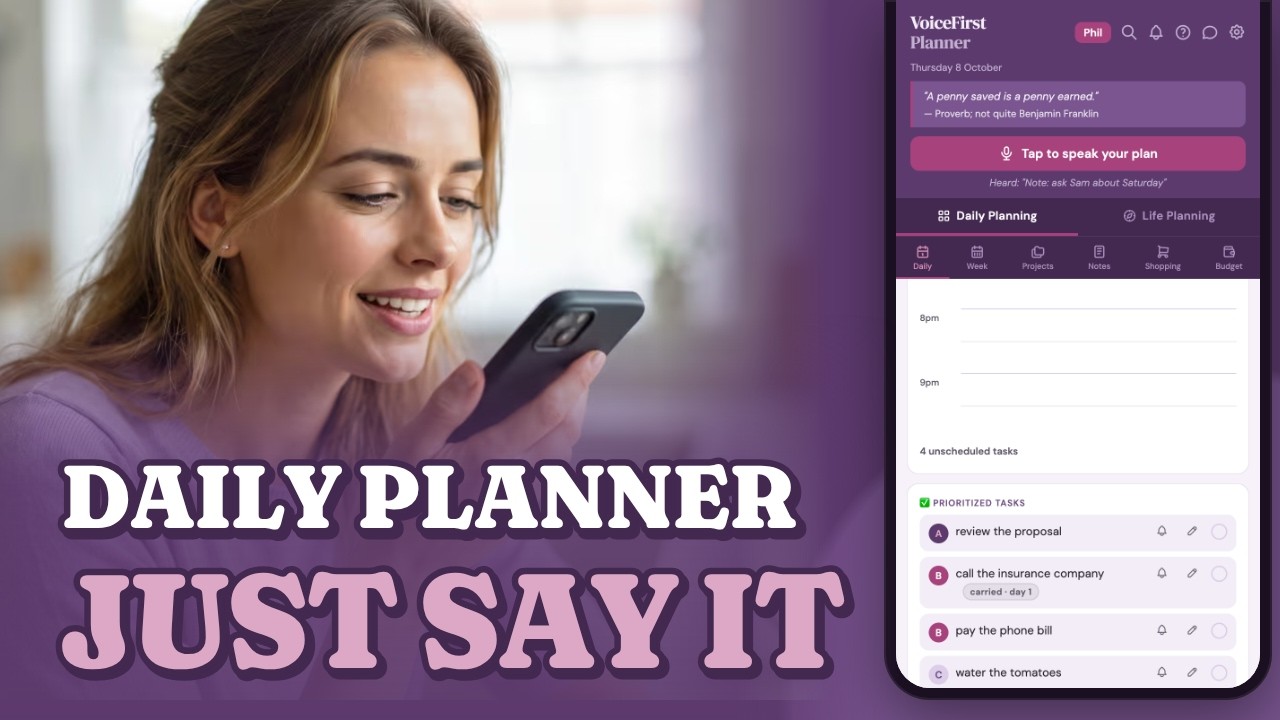
Prefer YouTube? Watch it there ↗
A daily planner online, on whatever is to hand
VoiceFirstPlanner runs in the browser, so it is a daily planner online: the same day on a phone, an iPad or a computer, with nothing to install. It is a web app, not something downloaded from a store.
On an iPad held sideways, or on a computer, Planner view lays the day out as a two-page spread: the day on the left, and the notes and the hour-by-hour schedule on the right. Planner view is part of the free plan.
And the day can still be typed. Voice is the quick way in, and typing works too: a task can be typed in and ticked off, as in any planner.
What it costs
VoiceFirstPlanner is free to start, with no card. The free plan is a working planner with limits, not a trial, and everything in the film is on it, with five tasks a day. Premium takes every limit off, at $3.99 a month billed annually at $47.88, or $7.99 month to month.
Common questions
What is the best daily planner app?
The one that does all five jobs and suits how the day actually arrives: one focus, a short list in priority order, the fixed times, room for notes, and a way to carry forward what didn’t get done without writing it out again. For a day that tends to turn up while hands are full, a daily planner app that takes it by voice is worth a look.
Is there a free daily planner app?
Yes. VoiceFirstPlanner is free to start, with no card, and the free plan is a working planner with limits, not a trial. It holds five tasks a day, and everything shown in the film above is on it. Premium takes every limit off, at $3.99 a month billed annually at $47.88, or $7.99 month to month.
What is a structured daily planner app?
A daily planner app that gives each part of the day its own place, rather than one long list: a focus, tasks in priority order, appointments on a schedule, and notes. In VoiceFirstPlanner each of those is said in one sentence and lands in its place.
Is there a daily planner online, with nothing to download?
Yes. VoiceFirstPlanner runs in the browser on a phone, an iPad or a computer, with nothing to install, and the same day is on each of them.
A day said once, in six sentences, and nothing falls off the end of it.
VoiceFirstPlanner is free to start, with no card.
Three books. All free with your account.
The VoiceFirstPlanner Instruction Manual, The VoiceFirstPlanner Voice Command Guide and The Voice First Life Planning System — Starter Workbook.
$19.98 for the Starter Workbook alone — all three free when you create your free account.

Not sure where to go next?
Start here: eleven reasons on one page →